Jump scare video steps at a glance
- Plan the build, the reveal and the timing
- Generate the calm build shot
- Generate the reveal as a still image
- Animate the reveal into a lunge
- Generate the room tone and the stinger
- Cut the scare in Compose
- Watch it cold, then export
How to make a jump scare video, step by step
Plan the build, the reveal and the timing
A jump scare has two halves, and the scare lives in the contrast between them. Write down three things before you generate anything:
- The build: an ordinary place where nothing happens. A hallway, a kitchen at night, a bedroom doorway.
- The reveal: one sudden image that breaks the calm. A face, a figure, a lunge toward the lens.
- The timing: roughly 4 to 6 seconds of build and 1 to 2 seconds of reveal. Our cut uses 4.8 seconds and 2 seconds.
Plan a build that relaxes the viewer. If the opening already looks threatening, the reveal has nothing to break.
Generate the calm build shot
Open Morphic, create a file, and switch the prompt bar to Video. We used MiniMax H3 Max Turbo at 768p, 16:9 and 6 seconds, which gives a little extra length to trim. Ask for a still or barely moving camera and say outright that nothing moves.
Static locked-off camera with a very slow creeping push-in down a dim, ordinary upstairs hallway in a family house at night. Beige carpet, framed photos on the wall, a small plug-in nightlight glowing warm near the floor, a bedroom door slightly ajar at the far end with darkness behind it. Nothing moves. Quiet, calm, ordinary, a little too still. Cool blue moonlight from a window on the left, low-key lighting, cinematic, 35mm, subtle film grain.
The door left ajar does quiet work. It gives the eye somewhere to rest without promising anything, which is exactly what a build should do.
The build shot: an ordinary hallway where nothing happens
Generate the reveal as a still image
Switch the prompt bar to Image and generate the reveal frame first, so you can pick the face and lighting before you spend a video generation. We used Nano Banana 2, which handled dark, low-key horror frames best in our model comparison.
Horror film still, extreme close-up. A gaunt pale figure with hollow black eyes, grey cracked skin and long lank dark hair lunges straight toward the camera out of total darkness, mouth open wide, face filling most of the frame, lit hard from below by a single cold flashlight beam. Slight motion blur on the hair, deep black background, shallow depth of field, 35mm, heavy film grain, desaturated teal palette, 16:9.
Keep the reveal invented. A generic pale figure works. A recreation of a famous film monster does not, and it is not yours to publish.
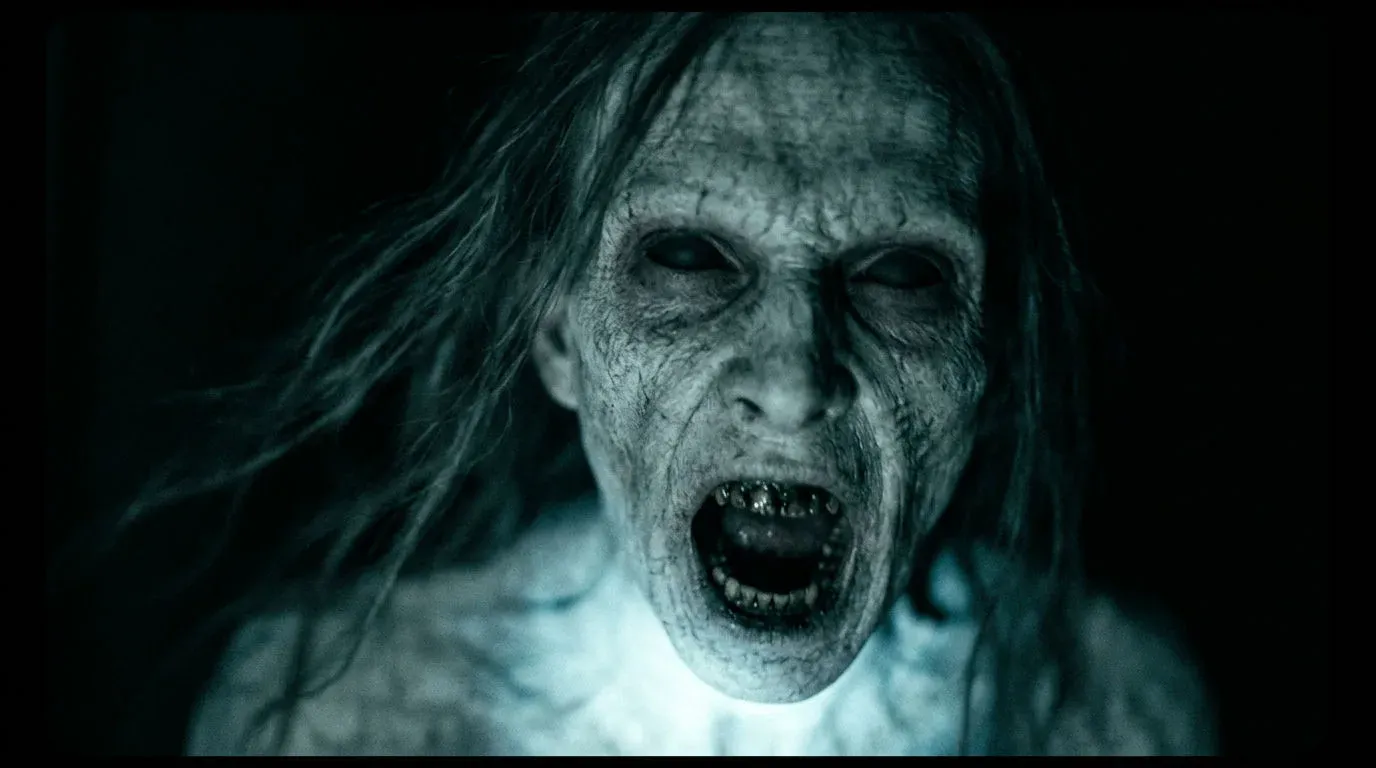
Animate the reveal into a lunge
Select the still, switch to Video, and keep MiniMax H3 Max Turbo at 768p. With an image attached, the model animates that exact frame. Ask for the violent motion in the first second, so the scare starts the instant you cut to it.
The pale figure suddenly lunges violently straight at the camera in the first second, fast and jerky, hair whipping forward, mouth stretching open, the camera jolts backward with a sharp handheld shake, the flashlight beam flickers. Abrupt, fast, aggressive motion, then the face fills the entire frame.
The animated reveal: the lunge lands inside the first second
Generate the room tone and the stinger
Sound is half the scare. Switch the prompt bar to Audio and generate two sound effects: a near-silent room tone for the build and a short, violent stinger for the reveal.
Quiet eerie room tone for a horror film: a very low, soft sub-bass drone with faint air hiss and a distant creak, almost silent, slowly building tension, no music, no voices.
Ask for the hit "at the very start" with "no build-up". A stinger that swells in loses the instant attack that makes people jump.
Cut the scare in Compose
Open Compose, the built-in video editor, and lay the pieces out on the timeline:
- Video track: the build shot trimmed to 4.8 seconds, then a hard cut to the first 2 seconds of the lunge. No transition. A fade or dissolve warns the viewer.
- Audio track: the room tone under the build at about 70% volume, then the stinger starting on the exact frame of the cut at full volume.
- Check the sync: scrub to the cut and confirm the stinger's first peak sits on the first frame of the reveal. In our cut the build stays around 30 dB quieter than the stinger, and the stinger peaks at 4.8 seconds, the cut frame.
You can drag the clips from Assets onto the timeline, or type the layout into the Compose chat and let it place them for you.
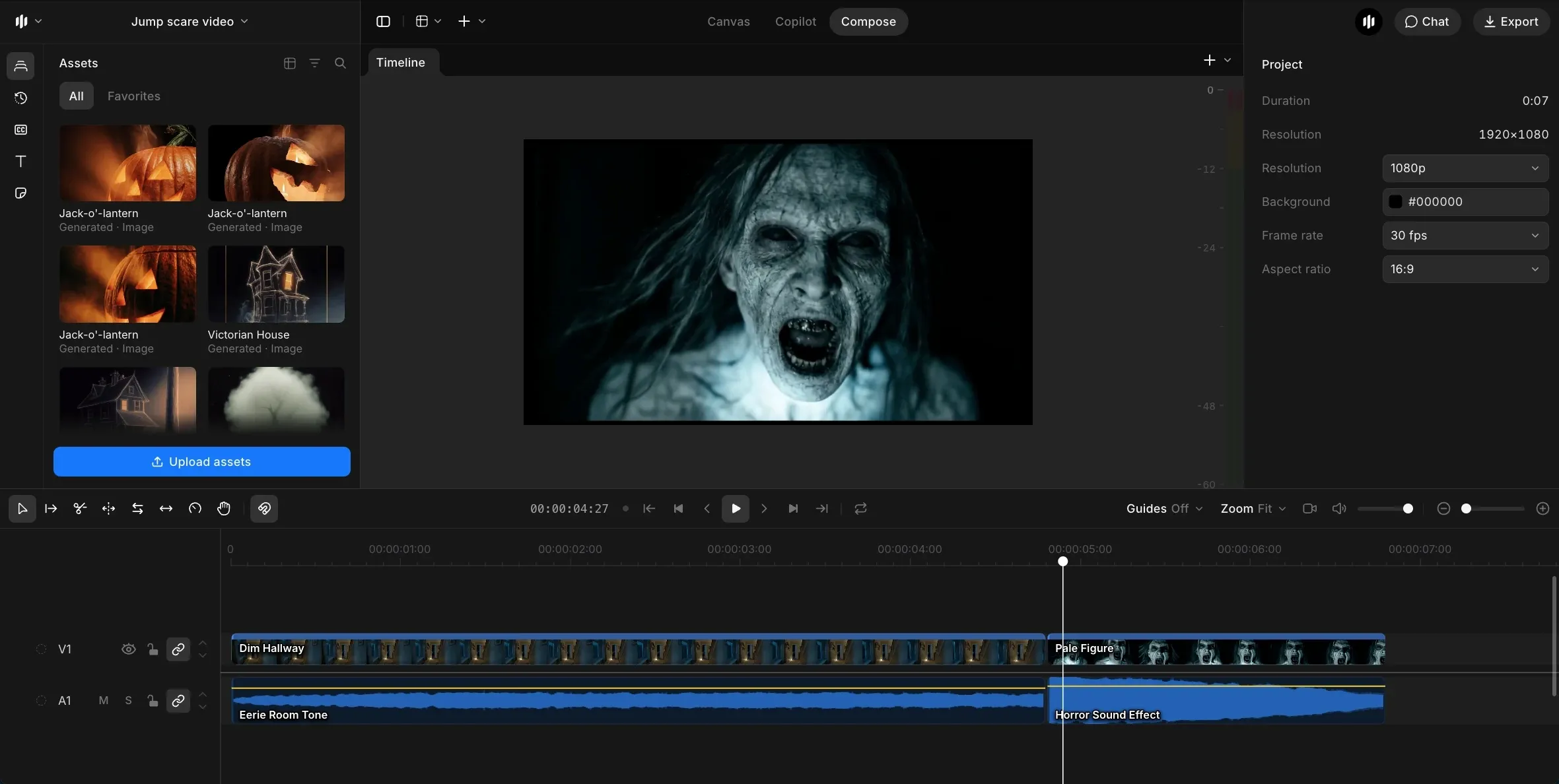
Watch it cold, then export
Step away for a minute, then watch it with sound on as if you had never seen it. If you do not flinch, the build is probably too short or the stinger is a few frames late. Lengthen the build by half a second or nudge the audio, and watch again. When the timing lands, export from Compose and post it.
The finished jump scare, with sound. Unmute to hear the stinger land on the cut.
What makes a jump scare land?
The effect is all contrast. Here is what to get right and what to avoid.
| Element | Do | Avoid |
|---|---|---|
| Build | Calm, ordinary, 4 to 6 seconds | Hinting at the scare |
| Reveal | Violent motion in the first second | A slow or soft reveal |
| Cut | A hard cut, no transition | A fade that warns the viewer |
| Sound | Near-silent build, loud stinger | Music under the build |
| Timing | Stinger on the cut frame | Audio a few frames late |
Jump scare ideas to try next
Once the hallway cut works, the same build, reveal and stinger structure carries over to other setups. Each one below keeps the build ordinary and moves the reveal somewhere the viewer is not looking.
- The mirror: a slow push-in on a bathroom mirror, then a figure appears behind the reflection.
- The window: a kitchen at night, then a face presses against the dark glass.
- The phone screen: a scrolling feed, then a face fills the screen.
- Under the bed: a calm bedroom, then a hand reaches out from beneath the frame.
For more scare formats, see the jump scare videos gallery and the jump scare sound effects. For a lighter Halloween piece, follow how to make a Halloween video with AI, and browse more Halloween videos.